Proud partner

Proud partner
Article


Google RankBrain is a term that has been around for some time, but it is high on the list of SEO trends for 2019. As an online marketer in 2019, you’ll be lagging behind if you haven’t heard of – or are not capitalising on – Google RankBrain or User Intent. It’s time to make the most of it!
RankBrain is the part of Google’s core algorithm that uses machine learning to provide users with better search results based on their search queries. Google itself revealed back in 2015 that RankBrain is its third most important ranking signal.
RankBrain helps the algorithm interpret complex, long-tail keywords and the user intent behind them. It can identify patterns amongst seemingly complex search queries and understand how they are similar and what the connections are. Furthermore, it can understand future complex search queries and/or link them to specific topics that cannot be directly inferred from the search query itself.
RankBrain pays particular attention to the context in which search queries are used. RankBrain links search queries together, identifies which topics are relevant to specific queries, and analyses millions of keyword combinations, their results, and the actions taken by the user.
A good example is a name change for a product or brand. Using RankBrain, Google can display results from pages where the search term (a new name, for example) does not appear in the text. RankBrain has already learnt, through the behaviour of millions of users, that a name has changed and makes the connection with the old name.
In other words: RankBrain is smart, and the more data it collects, the smarter it becomes at handling users’ search queries.
To test whether the algorithm delivers good search results, Google monitors how users react to the results produced by RankBrain:
Which user actions indicate that the search results are accurate?
What actions indicate that the search query is unsatisfactory or that the results are not what the user had in mind?
Before RankBrain existed, Google looked at keyword usage on the page itself, without considering the context. It merely predicted whether the results returned were in line with what you meant. In other words: the search results were far from optimal, especially if the user wasn’t ‘clear’ enough. Thanks to RankBrain, things are different nowadays. Now Google understands the intention behind your search query.
Understanding RankBrain is one thing. Using this knowledge to your advantage is another. As Google continues to get smarter, the SEO tip for 2019 is to adapt to this reality.
Four tips on how to adapt to the RankBrain algorithm as quickly as possible:
1. Optimise your meta tags and title to make them more appealing, as RankBrain now analyses the actions and context surrounding a search query. Use this to improve your ranking in the search results.
Making your meta titles and meta descriptions more interesting increases the likelihood of users clicking through. If they are descriptive and appealing, you can generate more clicks. If your result receives more clicks than the results above yours, this works in your favour.
2. Ensure visitors get what they’re looking for: Respond to user intent
Once users have clicked on your search result, you want them to stay on the page. That’s why you need to ensure they find exactly the information they’re looking for at that moment. Make sure the content of your page perfectly matches ‘the query’ or (the combination of) keywords that have been entered.
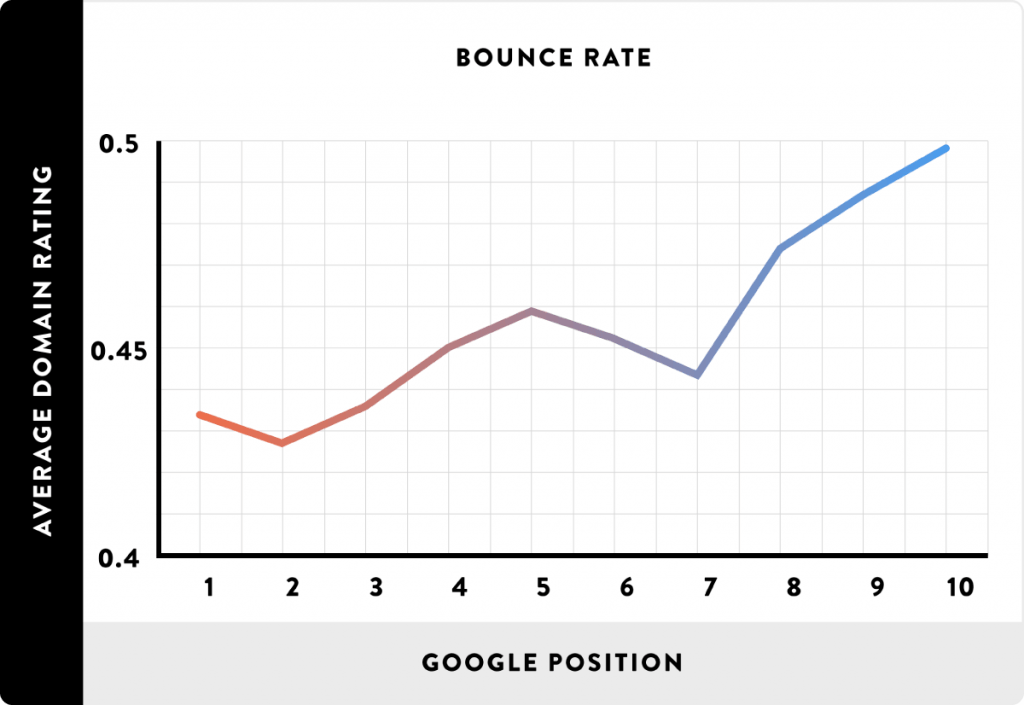
3. Increase dwell time, reduce bounce rate!
Once you have gathered the right content to respond to the user’s query, it is also essential to present it in the right way. As is well known, first impressions are the most important. You should therefore use a short, easy-to-understand introduction, explaining straight away what the visitor can find on the page. Try to make this clear in just a few short, enthusiastic sentences. A long and difficult-to-read introduction can result in a high bounce rate and a short dwell time.
You then want the user to find the information on the page easily, but also not to leave too quickly. Therefore, try to write in short paragraphs with plenty of subheadings and short sentences. This makes it easy for the user to scan your article and take in the relevant information. By using short paragraphs with subheadings, the page will also be longer, encouraging the user to scroll further down.
4. View the top results in the SERP
What are your competitors doing differently? Do they provide visitors with different information, or can visitors sometimes find the information they need more easily on their sites? It may well be that they are better at responding to user intent. Try to be just as comprehensive – and, of course, do it even better!
If you’re working on improving your rankings in the SERPs and are just below your competitors’ positions, applying the tips above can be very useful. By simply responding to the user’s needs, you can use Google RankBrain to beat your competition.




Our team is
ready to help you