Proud partner

Proud partner
Article

No fewer than 8.7 million Dutch people use YouTube. The social media network has gained 9 per cent more users in our country over the past year, which shows that video content is really on the rise. So it’s smart for a business to capitalise on this! In this blog, we’ll therefore tell you more about the possibilities of advertising on YouTube.
When advertising on YouTube, we focus on TrueView for Action. A visitor has not visited your website first but is shown an advert in a location of your choosing within YouTube. The targeting here is based on the search terms people use on Google; you can then target these relevant searchers again when they are watching a video on YouTube. People who have searched for specific keywords fall within the target audience. This allows you to target a large group whilst ensuring relevance is not lost.
Leads and conversions are generated by adding CTAs and header overlays to video adverts. In this way, the advert is displayed when people watch a video on YouTube. This option is particularly well-suited to the ‘Think’ phase, when the target audience has already shown an interest.
Thanks to the wide range of options available at social, it is a suitable channel for every stage of the customer journey. At Traffic Today , we work according to the ‘see, think, do and care’ principle. For social , this specifically means:
See = Creating awareness and interest using lookalike audiences and interest-based targeting;
Think = Maintaining visibility through remarketing, for which the Facebook Pixel and TrueView for Action are ideally suited;
Do = Advertisements with a direct link to the website and lead generation via Facebook
Care = Building customer relationships and loyalty through the organic section of the page
There are four different types of Trueview adverts:
When someone watches a YouTube video, they are shown an advert. They can normally skip these after watching for 5 seconds. The great thing about this method of advertising is that, for a long advert, you only pay after 30 seconds, and if the advert is shorter, they have to watch it right to the end. Given that many people skip adverts, this means you get a lot of free impressions. Bear in mind, however, that you also pay when a visitor interacts with your video.
A viewer can engage with your YouTube advert in various ways:
This form of advertising on YouTube allows advertisers to have their ad appear in various locations. Payment is made only per click on the video itself. The image below shows various options for discovery ads:
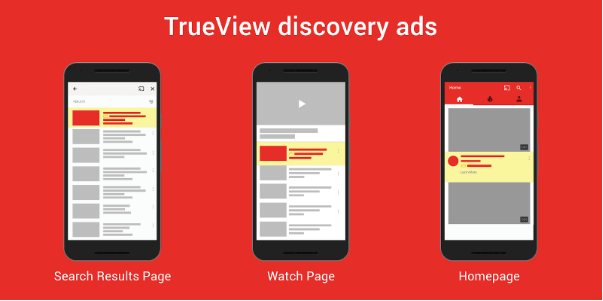
The adverts shown to users are always based on previous searches and search terms used. This level of relevance makes advertising on YouTube very attractive, as you gain visibility and impressions without the visitor having to click on your advert.
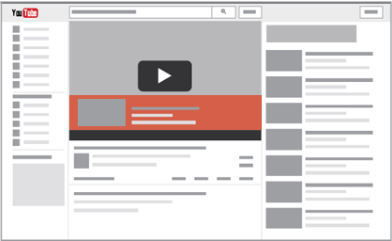
This type of advert on YouTube cannot be set up via Google Ads, but is available within sponsored campaigns. These adverts appear as an overlay on the YouTube video selected by the user and can be clicked away. It is possible to complement these adverts with the standard display adverts on the right-hand side of YouTube.
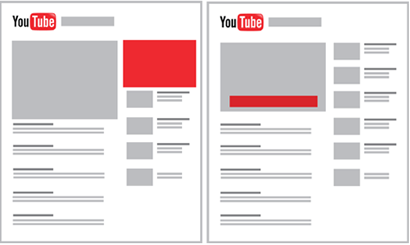
Of course, it is also ‘simply’ possible to use standard display ad advertising s within YouTube. In fact, this provides good support for the overlay ad s discussed earlier. The image above illustrates where the ad s are visible. Display adverts are available in various formats (PNG, JPEG, HTML5 & GIF) and cannot be clicked away by the visitor. The advantage of display adverts on YouTube is that they do not appear within the video frame and therefore do not negatively impact the visitor’s viewing experience.
Now that you know the possibilities of YouTube advertising, it’s important to think about the video content. What do you want to achieve with the advert? Do you want to increase brand awareness for your business? Do you want to highlight a specific promotion? Or do you want to boost sales? Defining the objective is one of the most important steps in creating an advert. Always keep this objective in mind when creating a video, or communicate it to the partner producing your advert. Next, it’s time to define the message. Your message must align seamlessly with the objective you’ve set.
With your advert, you want to encourage the viewer to take a specific action. So think carefully about the Call to Action (CTA) within the video. You can often achieve this by including an eye-catching button or link in the video that the user can click on.
We recommend placing the CTA as early as possible in your advert. That way, users will see it before the advert has finished.
It is also possible to use ‘cards’ and ‘end screens’. These are clickable elements that allow you to direct your visitor to your website or YouTube channel. A card is the ‘i’ symbol in the top right-hand corner of the advert. You can decide for yourself at which point in the video this appears. With a card, you can link to a product or service mentioned in the advert. Furthermore, it is also possible to link to another video.
Another feature you can make use of is adding an ‘endscreen’. This appears at the end of the video. With an ‘endscreen’, you can direct a viewer to your YouTube channel or to other social media channels.
With so-called ‘Skippable TrueView’ in-stream adverts, you have five seconds to grab the viewer’s attention. After this, the user can skip the advert. This type of advert appears during or after a YouTube video. It is therefore important to think carefully about the first five seconds of a video. How do you keep the viewer engaged? Put yourself in the target audience’s shoes and think carefully in advance about how you can stimulate the viewer visually. Of course, the viewer must also remain engaged for the rest of the video. That’s why we recommend not making the video too long. We advise you to create a video lasting between 20 and 40 seconds.
A video advert provides you with a wealth of data on its performance. This allows you to optimise the campaign where necessary and to test certain elements. Go to your Google Ads account and create a new campaign. Select the campaign objective and then choose the ‘video’ campaign type.
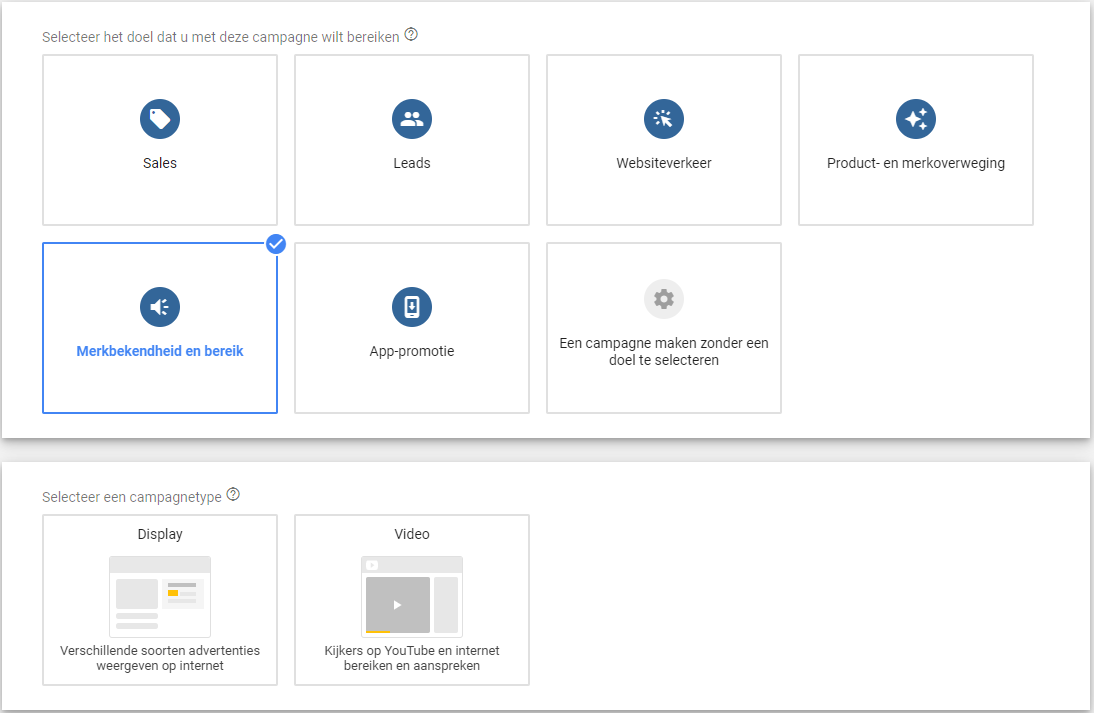
Below is an overview where you can select the campaign subtype. Have you made your choice? Next!
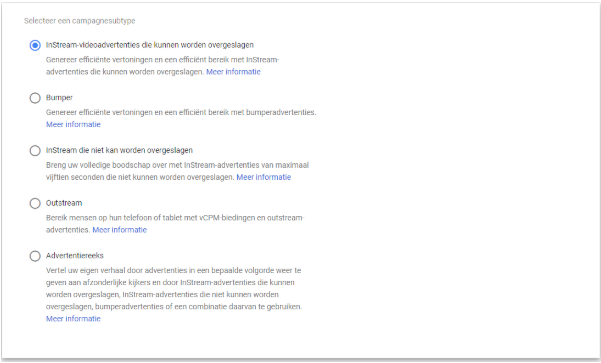
Time to target your audience. You can select an audience based on demographic data, interests, keywords, topic, placement and remarketing. Think carefully about exactly who you want to reach with your advert, so that the right audience sees your video advert.
Depending on your choice of advert and target audience, the costs you’ll need to factor in will vary. Based on this, Google provides an estimate of the number of ‘ clicks ’ or views. You pay per click or view, based on a daily limit and a set budget per CPC. Don’t forget to enter an end date.
Time to get started with YouTube yourself Advertising. Do you have any questions, or could you do with some help creating or setting up a YouTube advert? Please feel free to contact us. Our specialists will be happy to help.




Our team is
ready to help you